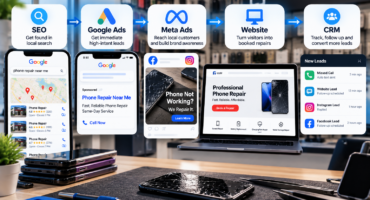

The best Meta ad creative for a phone or electronics repair shop is usually a short, authentic visual that shows a familiar device problem, demonstrates the shop’s expertise, and gives the viewer one clear next step.
A vertical video that opens with a cracked screen, shows a technician working on the device, and ends with the repaired result is often more persuasive than a polished graphic that only displays the shop’s logo. The customer recognizes the problem, sees evidence that the shop handles it, and knows how to respond.
Effective electronic repair shop ad creatives do not need to resemble expensive commercials. They need to attract the right local customer, communicate trust quickly, and make the repair process feel straightforward.
What Makes Repair Shop Ad Creative Effective?
A strong repair ad should capture attention quickly, show a recognizable problem, reduce uncertainty, and direct the customer to call, message, or request a quote.
Meta recommends introducing the brand and primary message early, designing video for mobile viewing, and keeping ad text clear and concise. It also encourages advertisers to use varied creative rather than relying on one image or video for every audience and placement.
For repair businesses, this means an ad should not begin with a long logo animation. Someone with a broken screen, weak battery, damaged charging port, or malfunctioning console should understand the subject within the first few seconds.
1. Problem-and-Solution Videos
Problem-and-solution videos are one of the strongest formats for repair lead campaigns.
The opening shows the problem, such as a shattered display, a phone that will not charge, a broken laptop hinge, an overheating console, or a tablet with no picture. The middle shows the technician inspecting or repairing the device. The final scene shows the result and a direct action such as “Message us for a repair quote.”
This format works because it mirrors the customer’s situation. The viewer does not need to interpret a broad claim like “Quality electronics service.” The ad shows the issue, service, and expected result in a simple sequence.
Keep each video focused on one repair category. Combining phone, tablet, laptop, console, and device-buyback messaging in one short ad usually weakens the hook.
2. Before-and-After Repair Creatives
Before-and-after images and videos provide immediate visual proof. They are especially useful for cracked screens, damaged housings, broken hinges, dirty consoles, and other problems with a visible result.
Use a clear view of the original damage, a matching view of the repaired device, a short label identifying the service, and one call to action. The images should come from genuine repairs completed by the shop, with customer permission when necessary.
Meta recommends using high-resolution images and avoiding visuals that appear excessively altered. Real repair photos also help establish credibility because they show actual work rather than unrelated stock photography.
3. Technician Demonstration Videos
Technician videos help establish expertise without making an ad feel overly promotional.
A technician might explain why a screen flickers after a drop, how debris affects a charging port, what causes a game console to overheat, or why a water-damaged device should not be charged.
The strongest demonstrations answer one narrow question in plain language. They should not reveal customer information or promise a specific result before the device has been inspected.
4. Customer-Testimonial Creatives
Testimonials can address concerns that delay a repair decision. Customers may worry about workmanship, data privacy, turnaround time, communication, or whether the shop will support the repair afterward.
A useful testimonial briefly explains what was wrong with the device, why the customer selected the shop, how the repair process went, and what result they received.
Specific feedback is stronger than a generic compliment. “They diagnosed my charging issue, explained the repair, and kept me updated” gives potential customers more useful information than “Great service.”
Written reviews can also be used in static or carousel ads. Keep the wording accurate and do not imply that one customer’s result is guaranteed for every repair.
5. Short Vertical Videos for Reels and Stories
Repair footage fits Reels and Stories because close-up damage and fast transformations are easy to understand on a mobile screen.
Meta advises advertisers to use mobile-first creative, capture attention quickly, and adapt assets for placements such as Reels and Stories. It also recommends testing content designed specifically for Reels rather than assuming a standard feed ad will perform equally well everywhere.
A practical vertical video can follow this structure:
Opening: Show the damaged device and identify the problem.
Middle: Show the technician, diagnostic step, or repair process.
Ending: Show the repaired result, location, and next action.
Use captions or on-screen text because some customers will watch without sound. Important wording should also remain away from areas where platform buttons or captions may cover it.
6. Service-Specific Static Ads
Static ads can still perform well when the message is immediate and easy to read.
A real device photo can be paired with a short headline such as:
- “Cracked Screen?”
- “Phone Not Charging?”
- “Battery Draining Fast?”
- “Console Overheating?”
- “Laptop Hinge Broken?”
The image should support the headline rather than compete with it. Avoid listing every service, adding several calls to action, or placing long paragraphs inside the graphic.
Meta recommends concise primary text and headlines because wording may be shortened or displayed differently across placements.
Should Repair Shops Use Real Footage or Polished Graphics?
Both can be useful, but real footage should be included in the creative mix.
Polished graphics help maintain consistent branding and communicate simple service messages. Real repair footage provides stronger proof of capability and makes the business feel local and tangible.
A balanced creative library may include:
- Technician demonstration videos
- Before-and-after repairs
- Customer testimonials
- Service-specific static images
- Short educational clips
- Different opening hooks and calls to action
Meta’s performance guidance emphasizes creative diversification so its delivery system can match different formats and messages with people likely to respond. Automated creative tools can resize assets or create variations, but every version should still be reviewed for accuracy and brand consistency.
Common Creative Mistakes to Avoid
Electronic repair shop ad creatives often underperform when they are too broad or provide little proof.
Common mistakes include:
- Using unrelated stock images
- Advertising every service in one ad
- Starting with a long logo animation
- Making guaranteed repair claims
- Using technical language customers do not understand
- Hiding the shop’s location or service area
- Adding too much text to the design
- Sending customers to a generic homepage
The ad should also match the next step. A cracked-screen ad should lead to a relevant quote form, messaging flow, or booking page—not force the customer to search for the service again.
How Should Repair Shops Test Ad Creative?
Repair shops should test one major creative element at a time whenever possible.
For example, a shop can compare:
- A damaged-device opening against a technician opening
- A short video against a static image
- Repair footage against a customer testimonial
- Convenience messaging against expertise messaging
- “Request a quote” against “Send a message”
Performance should be judged through qualified leads, booked repairs, completed jobs, and revenue. Views and reactions can help measure attention, but they do not prove that the creative is attracting paying customers.
What Is the Best Overall Creative Approach?
The strongest strategy is to build a varied collection of authentic, service-specific creative.
Start with short vertical problem-and-solution videos. Add before-and-after proof, technician explanations, testimonial content, and simple static ads. Use real devices, genuine repair environments, and accurate claims. Keep each creative focused on one customer problem and one action.
Repair Max Marketing develops Meta campaigns specifically for electronics repair businesses, including repair lead, device-buyback, and resale campaigns. Its Meta Ads service includes campaign strategy, audience targeting, visual creative, copywriting, testing, conversion tracking, and ongoing optimization.
Final Answer
The best Meta ad creative for phone and electronics repair is authentic, mobile-first, easy to understand, and supported by visible proof.
A real damaged device, a knowledgeable technician, a clear repair result, and a direct call to action will usually communicate more than a generic promotional graphic. Repair shops should test several electronic repair shop ad creatives, track which ones generate completed repairs, and continue producing variations based on actual customer response.