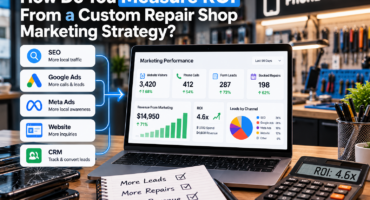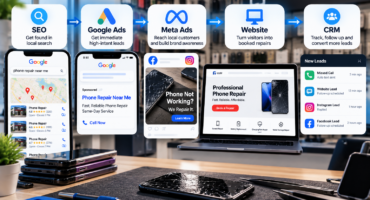

A repair shop can see clicks, calls, form submissions, and quote requests inside Google Ads and still not know whether the campaign is making money. The missing piece is closed-loop conversion tracking: connecting the original ad click to what happened after the lead contacted the shop.
For electronics repair businesses, the useful question is whether the lead became qualified, booked a repair, approved the work, and ultimately became a paying customer. When those stages are recorded consistently, a shop can judge Google Ads performance by real repair outcomes instead of click volume alone.
Closed-loop tracking does not mean every repair step has to be automated. A shop can start by recording a few consistent outcomes, then improve the setup as lead volume grows. What matters is that the same definitions are used from the first inquiry through the final paid ticket.
Why Lead Count Alone Is Not Enough
Two campaigns can each generate 30 leads and perform very differently. One may produce customers who need profitable screen replacements, data recovery, or MacBook repair. The other may generate price shoppers, unsupported devices, wrong-location calls, and people who never book.
If both are judged only by cost per lead, they can look equally successful. Once completed jobs are tracked, the difference becomes clear. A higher cost per lead may still be worthwhile if more of those leads become approved repairs with stronger margins.
Define the Conversion Stages Before Tracking Them
The first step is agreeing on what each stage means. A lead might be a phone call, form submission, instant quote request, booking, or chat inquiry. A qualified lead is someone who needs a service the shop provides and is within the service area. A converted lead is a customer who reaches the business outcome that matters, such as approving and paying for a repair.
Google Ads supports offline lead outcomes such as qualified leads and converted leads. Those labels become useful only when staff use them consistently. Create one internal definition for each stage so the reporting reflects the same process across the shop.
Preserve the Original Lead Source
Every Google Ads lead should enter the shop with enough information to identify where it came from. Website forms and booking systems should preserve advertising attribution where possible. Phone calls should use call tracking or another reliable method that distinguishes paid search calls from organic, direct, or referral calls.
For website leads, identifiers such as the Google Click ID can help connect an offline sale back to the ad interaction. Google also supports enhanced conversions for leads, which can use first-party customer information to improve attribution when properly configured. The principle is simple: do not let a Google Ads lead lose its source after it enters the repair workflow.
Use a CRM or Lead Management System
A spreadsheet can work for a small campaign, but it becomes difficult to maintain when calls, forms, quotes, and bookings arrive every day. A repair shop CRM gives the business one place to record the lead source and move the customer through the repair process.
Useful fields include the lead date, device, requested repair, campaign source, appointment status, repair status, final invoice amount, and whether the job was won or lost. This makes it possible to answer which campaign produced paying jobs, which service closes best, and which leads rarely convert.
Connect Online Leads With Offline Repair Outcomes
Most repair jobs are completed offline even when the customer starts online. Someone may click an ad, request a quote, visit the shop two days later, approve the repair, and pay at pickup. Basic website tracking sees only the first step.
Offline conversion tracking closes that gap. When a qualified or converted lead is sent back into Google Ads, the later outcome can be attributed to the campaign and ad interaction that helped create it. Google now recommends enhanced conversions for leads for advertisers setting up this type of offline measurement.
For shops using automated bidding, better conversion data can also help the system optimize toward stronger business outcomes instead of easy form fills alone.
Track Calls, Forms, Quotes, and Bookings Separately
Not every lead type behaves the same way. A phone call may convert differently from a form. An instant quote request may work well for screen and battery repairs, while a booking may show stronger intent than a general contact message.
Track these actions separately, then compare how many become qualified leads and completed jobs. If the site gets traffic but few meaningful inquiries, the issue may also be conversion-related. A strong repair shop website should make calling, quoting, and booking easy on both desktop and mobile.
Measure Cost per Booked Job and Paying Customer
Cost per lead is useful, but it should not be the final metric. Cost per qualified lead shows what the shop pays for inquiries that fit the business. Cost per booked job shows what it costs to create an appointment or confirmed drop-off. Cost per paying customer shows the advertising cost required to produce a completed sale.
Revenue can then be compared with ad spend. A campaign that spends $1,000 and generates $4,000 in repair revenue tells a more useful story than a report that only shows 50 leads. If the shop can also estimate gross profit by service, it can make better budget decisions.
Review Lead Quality by Service and Search Term
Once completed jobs are connected to the original source, the shop can evaluate services and search terms more intelligently. Phone repair, computer repair, MacBook repair, console repair, and data recovery may all produce different close rates and average tickets.
A keyword may look expensive at the lead stage but become highly profitable after closed jobs are counted. Another may produce cheap inquiries that rarely become paying customers. This is why keyword decisions should be based on business outcomes rather than search volume alone.
Audit the Tracking Before Trusting the Numbers
Conversion reporting can fail quietly. Duplicate form events, test submissions, unanswered calls, broken tags, missing source data, or staff who forget to update job status can distort results.
Regular QA should compare Google Ads conversions with CRM records, call logs, booking records, and actual repair tickets. Large differences should be investigated before budgets or bidding strategies change. Tracking should also respect customer privacy and applicable data requirements.

Build the Campaign Around Paying Repair Jobs
The most useful Google Ads report for a repair shop is not the one with the most clicks or even the most leads. It is the one that shows which advertising efforts consistently turn into real customers and profitable repair work.
Define the lead stages, preserve the original source, record outcomes in a CRM or tracking system, and connect qualified and converted leads back to Google Ads when possible. Then evaluate campaigns using booked jobs, paying customers, repair revenue, and profitability alongside standard ad metrics.
Repair Max Marketing helps electronics repair businesses connect advertising, websites, lead capture, CRM workflows, and conversion tracking so campaign decisions can be based on the jobs that actually reach the counter.
Contact Repair Max Marketing to review your Google Ads tracking and identify where leads may be getting lost between the ad click and the completed repair.