Google Ads can put a repair shop in front of customers at the moment they are searching for help. But not every repair service or keyword deserves ad budget. Strong campaigns usually focus on services with clear commercial intent, enough demand, realistic margins, and a landing page that can turn a click into a call, quote, or booking.
For repair businesses, choosing the right Google Ads keywords is less about building the biggest list and more about matching paid search demand to the jobs the shop actually wants. A shop that earns strong margins from phone repair, data recovery, or laptop repair may need a different campaign structure from one focused on console repair or device sales.
Start With the Services the Shop Actually Wants More Of
The first question is not, “Which repair keyword gets the most searches?” It is, “Which repair jobs are valuable enough to advertise?”
A shop may offer many services, but only a handful may justify paid search. Some repairs have better margins, faster turnaround, reliable parts availability, or a higher likelihood of becoming a completed ticket. Others may take too much technician time or be difficult to price consistently.
Before building campaigns, identify the services the shop wants more of and confirm the team can handle additional demand. Paid traffic should support the business model, not simply increase inquiry volume.
Prioritize High-Intent Repair Searches
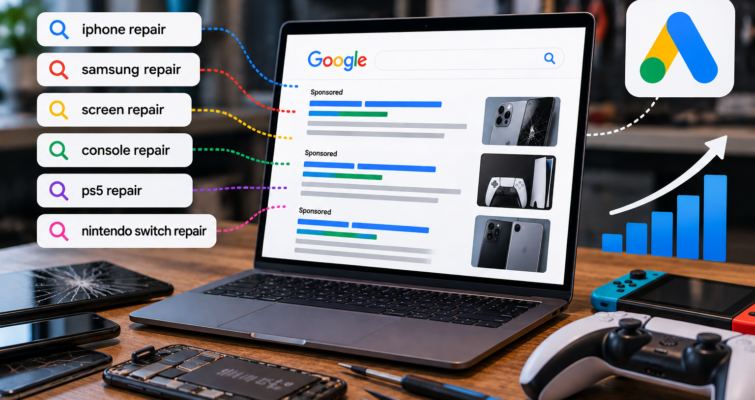
Google Ads works best when the search suggests that the customer is looking for a provider. Searches such as “phone repair near me,” “iPhone screen repair,” “computer repair shop,” “MacBook repair,” “data recovery service,” or “PS5 repair” usually show stronger buying intent than informational searches.
Compare that with searches such as “why is my laptop slow” or “how to replace an iPhone battery.” Those may be useful for organic content, but the person may want free instructions rather than a repair business.
A campaign can generate clicks without leads when the keywords attract the wrong intent. Repair Max’s guide on repair ads getting clicks but no leads explains why search intent should be reviewed before simply increasing the budget.
Use Broad Service Keywords Carefully
Broad terms such as “electronics repair,” “device repair,” or “computer repair” can reach useful customers, but they can also match a wide range of needs.
For example, computer repair searches may include laptops, desktops, business IT support, software problems, DIY troubleshooting, parts, or services the shop does not offer.
That does not make a broad keyword automatically bad. It means the campaign needs control through match types, negative keywords, geographic targeting, ad copy, and landing-page relevance. The broader the keyword, the more important it is to review the actual search terms triggering the ads.
Use Location Intent Without Duplicating Everything
Local repair customers often search with “near me,” a city name, or a neighborhood. Those searches can be valuable because the customer is looking for a nearby provider.
But the campaign does not need hundreds of keyword variations containing every ZIP code and “near me” phrase. Geographic targeting already controls where ads can appear.
A cleaner keyword structure combined with accurate location targeting and locally relevant landing pages is easier to manage than a long list of nearly identical phrases. The website and Local SEO strategy should support the same real service area.
Match Each Campaign to the Right Landing Page
A high-intent keyword can still waste money when it sends the customer to the wrong page.
Someone searching for data recovery should not land on a generic homepage and then search for the service. A customer clicking a MacBook repair ad should immediately see MacBook repair information, trust signals, contact options, and a clear next step.
The advertised service, landing-page headline, content, and call to action should all match. A conversion-focused repair shop website makes that path easier to control. If the page does not support the promise in the ad, changing keywords alone may not improve lead volume.
Negative Keywords Protect the Budget
Negative keywords help stop ads from appearing for searches that are unlikely to become repair customers.
Campaigns often need to watch for searches related to jobs, training, free software, DIY tutorials, parts-only shopping, manuals, wholesale components, or services the business does not offer.
Negative keyword management should come from the real search-term report rather than a one-time generic list. New irrelevant searches can appear as the campaign runs, so regular reviews help protect budget and improve lead quality.
Judge Keywords by Profitable Jobs, Not Just Leads
A keyword is not valuable simply because it generates inquiries. The leads still need to become profitable jobs.
A repair shop should compare advertising cost with booked jobs, average ticket value, gross profit, and the percentage of leads that become customers.
A higher-cost data recovery lead may still be worthwhile if completed jobs have strong value. A lower-cost screen repair lead may be attractive because of volume and fast turnaround. This is why conversion tracking should go beyond clicks. Calls, forms, quote requests, bookings, and completed repair outcomes provide a better picture of which services deserve more budget.
Give New Campaigns Enough Data, but Keep Optimizing
A new campaign needs time to collect search-term and conversion data, but poor traffic should not run untouched for months.
Early optimization should focus on irrelevant searches, weak geographic targeting, missing negative keywords, broken tracking, and landing pages that do not match the ads.
The first 30, 60, and 90 days can be used to separate promising service campaigns from those that need restructuring. Repair Max’s guide to how long Google Ads take to generate repair leads explains what should be evaluated as the account matures.
Keep Policy and Account Health in the Plan
Repair businesses should make sure ads, landing pages, billing, and account setup follow current Google Ads requirements.
A strong keyword strategy does not help if an ad is disapproved or the account cannot serve. Claims on landing pages should be accurate, destinations should work, and the business should avoid unsupported statements about authorization, guarantees, or services.
If ads stop serving, diagnose the stated policy or account issue before making random changes. The guide to Google Ads disapprovals and suspensions for repair shops covers the main areas to review.
Which Services Should a Repair Shop Test First?
Start with services that combine strong customer intent, healthy margins, realistic local demand, and a clear landing page.
For many repair businesses, that may include phone repair, iPhone repair, computer or laptop repair, MacBook repair, data recovery, console repair, or other high-value services the shop is already known for. The exact mix should be based on the business rather than copied from another shop.
Launch with enough focus to learn which searches and services create qualified leads. Then expand only when the data supports it.
Build Google Ads Around the Jobs You Actually Want
The best Google Ads keywords for repair shops are not simply the phrases with the highest search volume. They are the searches that connect valuable repair services with nearby customers who are ready to take action.
That means prioritizing commercial intent, using the right landing pages, controlling broad searches, maintaining negative keywords, tracking real conversions, and judging campaigns by completed business outcomes rather than clicks alone.
Repair Max Marketing builds Google Ads campaigns specifically for electronics repair businesses, with service targeting, landing pages, tracking, and optimization centered on qualified repair opportunities.
Contact Repair Max Marketing to review which repair services and Google Ads keywords make the most sense for your shop and local market.